


Track your parcels - 1Track
4.3353.00 Reviews
App Specs
- Version
- 1.9.11
- Updated On
- License
- Free
- Downloads
- 500,000+
- Developer
- KoalaKode
- Categories
- Shopping
- Platform
- Android
Screenshots
 Analysis by AppCompare
When a few orders are due in the same week, checking separate emails and courier pages can turn a small errand into a recurring distraction. I find a shared tracking view most useful when it replaces that scattered routine without asking me to reorganize how I shop. Track your parcels - 1Track is built for that practical job: bring shipment progress into one place and let me check when there is a reason, rather than out of habit.
A sensible routine for several orders
My preferred way to use a parcel tracker is to add a shipment as soon as I have its tracking number, then leave it alone until a status changes. That is more reliable than trying to remember which retailer sent which order or saving several courier pages in a browser. Since 1Track is aimed at parcels from services and retailers including China-based sellers, AliExpress, ASOS, Amazon and USPS, it suits people whose deliveries pass through different parts of the shopping and shipping process.
A realistic example is ordering a household item from Amazon while also waiting for a parcel from an overseas marketplace and a domestic USPS delivery. Instead of searching each confirmation email every morning, I can put the tracking details together and check them in one session. The benefit is not that a shipment moves faster; it is that I spend less time reconstructing where to look. If a package is urgent, I would still keep the retailer’s order page or the carrier’s own tracking page handy for the most authoritative details.
Small habits that make tracking more useful
The practical value of notifications depends on how I handle them. I would enable them if I have several active deliveries and want a prompt when a shipment’s status changes, but I would not treat every alert as a delivery appointment. Carrier scans can arrive in batches, and a notification is a convenient signal to check the latest record, not a guarantee that a parcel is nearby or will arrive at a particular hour.
One helpful habit is to add a tracking number only after checking that it belongs to the order I expect. When several purchases are made close together, copying the wrong number can make an otherwise tidy list confusing. I also find it useful to check the tracker at deliberate moments—perhaps when I have time to act on a delivery update—instead of opening it repeatedly while a parcel is in transit. That keeps a package tracker a useful tool rather than another source of phone-checking.
1Track is a free shopping app from KoalaKode, with optional in-app purchases. Its average rating is 4.3 from around 26,000 ratings, and it has been installed over 500,000 times. It is rated for Everyone, and version 1.9.7 runs on Android 7.0 or later. Those details make it approachable for a broad range of Android users, while the purchase options are worth noticing if you prefer apps with no paid extras at all.
Getting Started with 1Track
First things first, downloading Track your parcels - 1Track is a breeze. It’s available for both Android and iOS, so no one’s left out of the loop. Once you’ve got it installed, the app greets you with a clean and straightforward interface. No frills, no fuss—just the way I like it.
Worth Reading Before You Choose

Flipboard Shows What News Apps Must Do Beyond the Feed

Switching to Android Auto Means Rethinking Your Driving Routine

Google Calendar Makes a Crowded Week Easier to Manage

Ludo King Makes the Most of the Minutes Between Plans

Baby Panda World Brings Quick Play to Modern Phones, but Its Game Library Feels Busy

ESPN’s Live Game View Makes Following Close Games Easier
User Interface and Experience
The design is intuitive, with a minimalistic vibe that helps you focus on what really matters: your parcels. You can easily input your tracking numbers, and the app does the rest. It supports a wide range of couriers worldwide, so whether you’re waiting for a package from Amazon or a letter from grandma, 1Track has got you covered.
The app also allows for push notifications. This feature is a lifesaver because, let’s face it, no one wants to keep checking their phone every five minutes. You get a gentle nudge when there’s an update on your package, so you can go about your day without a worry.
Features That Stand Out
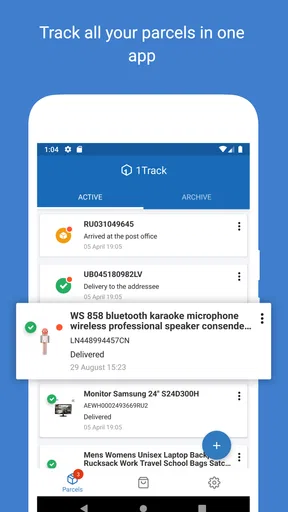
One of the standout features is the ability to track multiple packages simultaneously. If you’re like me and have a tendency to order half the internet, this feature is a game-changer. You can see all your parcels in one place, each with its current status and estimated delivery time.
Another nifty feature is the map view. It’s not just cool to look at; it’s also incredibly functional. You can see where your package is in real-time, which is perfect for those of us who are visual thinkers. Plus, it’s pretty satisfying to watch your parcel make its journey across the globe.
What Could Be Better?
While 1Track does a lot of things right, it’s not without its faults. Occasionally, I noticed a slight lag in updates. While this isn’t entirely the app’s fault—courier services are sometimes to blame—it would be great if 1Track could somehow streamline this process even more.
Additionally, the app could benefit from some personalization features. For instance, the ability to nickname your parcels or group them by type could make it even more user-friendly. It’s a small tweak, but sometimes the little things make a big difference.
Making a deliberate choice between trackers
Compared with tracking each order inside its retailer’s app, a multi-parcel tracker is most useful when purchases come from several places. A retailer app may be the better choice for order changes, returns, payment details or delivery instructions, because those tasks belong to the seller rather than a tracking dashboard. A carrier’s own page is usually the sensible fallback when a scan seems incomplete or when I need the carrier’s exact wording. I would use 1Track as the overview, not assume it replaces either source for every task.
That distinction also helps set expectations around updates. A universal tracker relies on shipment information becoming available from the relevant carrier; it cannot make a carrier scan happen sooner. If a parcel appears stalled, I would first compare its latest status with the retailer’s order page, then consult the carrier if the delay matters. This avoids repeatedly refreshing the same information and helps separate a genuine problem from a quiet stretch between scans.
Who will get the most from it
I would recommend this kind of setup to frequent online shoppers, people ordering from more than one retailer, and anyone who has several deliveries in motion at once. It is especially convenient when an order crosses borders or changes hands between shipping services, because a single place to review progress is easier than remembering each route. The map view can add context for someone who likes seeing a parcel’s broad journey, while status notifications suit people who would rather be alerted than check manually.
It is less compelling if you usually have only one delivery at a time, already rely on a retailer’s app, or need a tracker to manage delivery instructions and claims. It is also not the right tool for someone who expects minute-by-minute location certainty: parcel tracking depends on carrier updates, and a map should be read as a helpful representation of reported progress rather than proof of a live position. For those cases, the carrier’s own service is a better place to resolve specifics.
What I would check before relying on it
If I were setting it up for regular use, I would first try one active tracking number and confirm that the displayed shipment is the one I meant to follow. Then I would decide whether push alerts are helpful for my routine or whether opening the app when convenient is enough. That small test matters more than adding every number at once: it shows whether the information is arriving in a useful form for the particular shipment, and prevents a mistaken entry from cluttering the list.
I would also treat estimated timing as guidance, not a promise. A delivery estimate is useful for planning whether I should stay alert for a parcel, but carrier scans and route changes can affect what happens next. If I need to be home or arrange a handoff, I would verify the delivery details with the retailer or carrier rather than making plans from a tracker’s overview alone. This is a modest extra step, but it is the difference between a convenient summary and a dependable delivery plan.
Where the convenience has limits
The main trade-off is that one dashboard can simplify checking while still inheriting delays or gaps from the underlying shipping updates. That is not unique to 1Track, but it matters if you are waiting for something time-sensitive. A quiet status does not necessarily mean the parcel has stopped moving, and a new scan may take time to appear. I would avoid interpreting a lack of change as evidence of loss; if the delivery is overdue or the status looks contradictory, the seller or carrier is the useful next contact.
There is another practical limit for people who want detailed organization. The original experience points to room for more parcel personalization, such as clearer nicknames or grouping. When several shipments have similar names, a bare tracking entry can take extra thought to identify. A simple personal routine—adding the number promptly and checking it against the right purchase—helps, but users who need extensive sorting may prefer a service that explicitly offers the organization tools they rely on.
Final Thoughts
All in all, Track your parcels - 1Track is a solid app for anyone who finds themselves anxiously awaiting deliveries. It simplifies the tracking process, supports a multitude of couriers, and offers handy features like push notifications and map views.
Sure, it has room for improvement, but the pros far outweigh the cons. If you’re tired of the endless cycle of manual tracking, give 1Track a whirl. It might just become your new best friend in the world of online shopping. Happy tracking!
My verdict on building a repeatable habit
For me, the strongest case for 1Track is not any single visual feature; it is the routine it makes possible. Add shipments when the numbers arrive, use alerts only if they reduce checking, and consult the original seller or carrier when you need to take action. That approach keeps the app focused on what it does well: gathering progress from different deliveries into an easier-to-scan view.
I would try it if your parcels regularly come from a mix of shops and shipping services, especially when you want a broad overview without opening several pages. I would skip it if your main need is changing an order, arranging a specific delivery, or investigating a delayed package, since those jobs call for the retailer or carrier directly. Used with that boundary in mind, it is a practical free starting point for keeping online orders in view without expecting a tracker to control the delivery itself.
Pros
- Easy-to-use interface for all ages.
- Supports multiple courier services.
- Real-time tracking updates.
- Customizable notifications.
- Sleek and intuitive design.
Cons
- Limited offline functionality.
- Ads can be intrusive at times.
- Occasional tracking delays.
- Limited language support.
- Requires account for full features.
FAQs for Track your parcels - 1Track
What features does the 1Track app offer for parcel tracking?
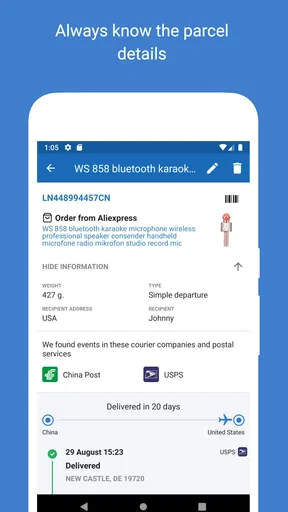
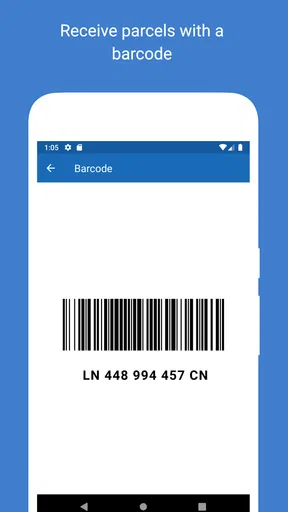
1Track provides real-time tracking for multiple parcels from various international carriers. Users can receive push notifications for status updates and access detailed tracking history. The app also supports barcode scanning for easy input and offers a user-friendly interface to manage all your shipments in one place.
Is the 1Track app available on both Android and iOS platforms?
Yes, 1Track is available for download on both Android and iOS devices. You can find it on the Google Play Store for Android users and the Apple App Store for iOS users. The app is designed to work seamlessly across both platforms, providing a consistent user experience.
How secure is my personal information in the 1Track app?
1Track prioritizes user privacy and security. The app uses encryption to protect your personal data and parcel information. Additionally, it does not require unnecessary permissions and adheres to strict privacy policies to ensure that your information is safe from unauthorized access.
Can I track parcels from multiple carriers using 1Track?
Absolutely! 1Track supports a wide range of international and domestic carriers, allowing you to track parcels from multiple sources in one convenient app. This feature eliminates the need to visit separate carrier websites, making it easier to manage all your shipments.
Is there a cost associated with using the 1Track app?
The 1Track app is free to download and use for basic parcel tracking features. However, there may be optional in-app purchases or a premium version that offers additional features, such as ad-free usage or advanced tracking options. Check the app store for details on any available upgrades.


